
tridon net
Formerly known as MoradNET, TridonNET provides internet service to homes and businesses in rural communities across the West Yellowhead region.
Simple, reliable internet for rural communities
TridonNET delivers internet services designed for rural homes and businesses. Whether you’re working, streaming, or staying connected, we offer flexible plans to meet your needs.
What it connects
- Available in rural West Central Alberta
- Residential and business packages
- Wireless and fiber options available
- All plans include unlimited data

Getting started is easy

Installation
- Installation starts at $149
- Additional costs may apply depending on setup needs
Billing
- Monthly billing cycle (1st to last day of month)
- Invoices sent at the beginning of each month
- Payment due within 20 days
Service Notes
- Speeds may vary based on network conditions
- Pricing and terms may change over time
Access Your Webmail
Access your MoradNET email quickly and securely. Use this portal to check your inbox, send messages, and manage your account. Log in to your MoradNET webmail to read, send, and manage your email from any device.

Check Your Email Anytime
Need help? Start here
No Internet Connection
Try these quick steps before contacting support:
- Make sure all equipment is powered on
- Unplug your router and plug it back in after 10 seconds
- Check cables are securely connected
- Ensure your router is connected to the correct port
Avoid resetting your router, as this may remove your settings.
Email Help
- Access your email through secure webmail
- Check your inbox storage if emails are not coming through
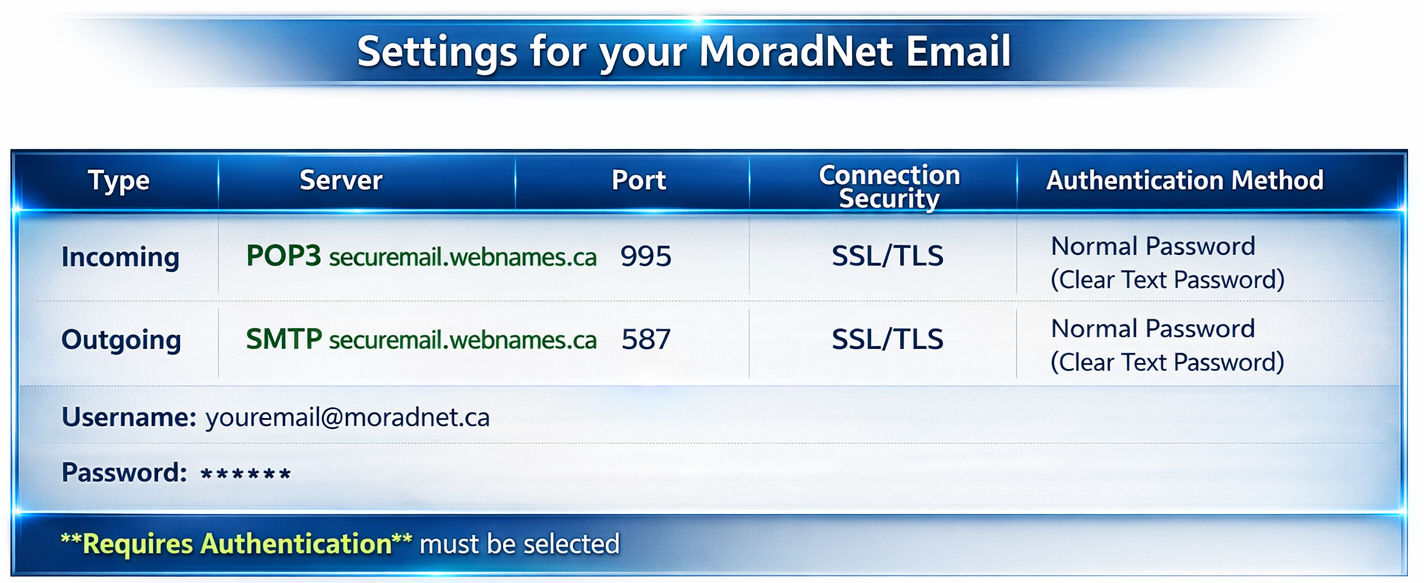
- Ensure correct server settings if using an email app
If you cancel your internet, your email may be removed unless you keep an email-only plan.
General Troubleshooting
- Restart your router regularly
- Keep your devices updated
- Use wired connections for better stability
- Reduce streaming quality if experiencing buffering
I can’t specify Connection Security without it changing my Port
Sometimes the Connection Security in your email program doesn’t allow the Ports to be selected (ex. 465 sometimes pops up when SSL/TLS is selected, instead of 587.) To bypass this little puzzle, accept the default ports and complete the setup, then go back into the account settings and manually enter the correct port information. This is sometimes the only way to get around the automatic port selection feature in some email programs.
Can get incoming mail but can't send email out
Check to make sure setup in your email program did not automatically change server to mail.moradnet.ca and ensure that it does have securemail.webnames.ca for (both incoming POP3 and outgoing SMTP).
It can also be a port problem so be sure to also double check that the outgoing port is 587 and incoming port is 995. Also check that you have SSL selected.
My emails aren’t on my phone anymore
Try to sign in to the https://securemail.webnames.ca/ website and sign in, double checking to make sure you have emails there. Your phone will sometimes not list the email to make room for more incoming to bring to your attention, however they can still be searched in the search bar if you know which email sender you are looking for. If all this is not possible, you may have accidentally deleted them and cannot be recovered on your phone.
Who can I contact with any questions about the email service
You can contact Tridon with any email account related questions, or to have your password changed ( all new passwords must be 6 characters long, have at least one number, uppercase, and lowercase letter).
Email Inbox is full
- Visit our website (https://securemail.webnames.ca/) and sign into your email account.
- From here, delete unwanted emails from the inbox. Remember to clear the deleted items from the trash/ deleted folder as well to completely clear emails from the server.
- Some email programs have a feature in the account settings “Delete from server when deleted from inbox” to make this process easier.
- Each program will have different steps to accomplish this, so you will need to consult the email program help pages / you tube videos for details.

Important Information
Security & Scam Awareness
Be careful when receiving support calls or messages.
- Only follow instructions from verified MoradNET technicians
- If unsure, hang up and call support directly
- Never share passwords with unknown sources
Remote support is only provided when arranged with our team.
Legal Information
Tridon (hereinafter referred to as “The Service Provider”)
COPYRIGHTS AND TRADEMARKS
All material found in the pages of this Website is protected under the copyright laws of Canada and of other countries.
Certain names, words, titles, phrases, logos, icons, graphics or designs in the pages of this Website may constitute trade names, trademarks or service marks of The Service Provider or its affiliated entities, or the use of which may have been licensed to them. The display of trademarks, trade names or service marks on pages at this Website does not imply that a license of any kind has been granted to anyone else.
Any unauthorized downloading, re-transmission, republication or other copying or modification of material posted on this Website, including trademarks, trade names and service marks, may violate federal, common or civil law trade-mark law and copyright law, and may result in legal action.
DISCLAIMER OF WARRANTIES
The information and material contained in this Website are believed to be accurate and complete at the time of their posting. Although The Service Provider attempts to ensure that all information and material remain current and accurate, The Service Provider does not warrant their accuracy, completeness and currency at all times.
No warranty of any kind, implied, express or statutory, including but not limited to warranties as to non-infringement of intellectual property rights or third party rights, title, latent defects, uninterrupted service, merchantability, fitness for a particular purpose and freedom from computer viruses, is given in conjunction with the information, materials and software algorithms.
EXCLUSION OF LIABILITY
In no event will The Service Provider be liable for any damages, including without limitation, direct or indirect, special, incidental, moral or consequential damages, loss of profits, opportunities or information or for expenses arising in connection with this website, with any software algorithms available thereon nor with any hyperlinked website or for use thereof or inability to use by interruption, defect, delay in operation or transmission, computer virus or line or system failure, even if The Service Provider is advised of the possibility of such damages, losses or expenses. Software algorithms made available and hyperlinks to other internet resources are at your own risk. The content, accuracy, opinions expressed, and other links provided by these software algorithms and resources are not investigated, verified, monitored, or endorsed by The Service Provider.
LINKS TO THIRD PARTY WEBSITES
The Service Provider does not control any third party website and is therefore not responsible for the content of any linked website or any link contained in a linked website. The Service Provider provides such links only as a convenience and the inclusion of any link does not imply endorsement, investigation or verification by The Service Provider of the linked website or information contained therein.
INTERNET E-MAIL
The Internet is not yet a fully secure medium, and therefore confidentiality and privacy cannot be ensured. The Service Provider will not be liable for any damages resulting from the loss or transmission of confidential or personal information.
Agreements and Policies
***please note that a PDF reader (ie Adobe Acrobat Reader) will be required to view the following documents.
NOTE: Tridon reserves the right to adjust pricing and other terms and conditions without notice. Please check regularly for any changes to pricing or other terms and conditions.
Account Setup
Third Party Device and Support Disclaimer
TridonNET is a direct connect services from The Service Provider. Routers or Modems are not provided or required to use these services.
- For WiFi and internal networking functionality, customers are responsible to provide their own router during the installation. The router, any other internal equipment and software is owned and operated by the customer so that they can customize, maintain, upgrade, or personalize user settings/password credentials to secure their internal network and privacy.
- The customer is solely responsible for requesting support for Third Party Devices and Accounts from their respective companies or authorized service representative. They are independently owned and managed by and are restricted under their own individual user policies; therefore we cannot communicate with these companies on the customers behalf.
- Data loss, corrupted data, lost credentials, hardware repair, recovery inquiries and concerns relating to the policies of these companies are not within The Service Provider’s scope of service.
- Customers are strongly urged to contact the respective manufacturers, vendors or authorized service representative for more direct and informative solutions to their product or service related concerns, eg:(ITunes: Apple, Gmail: Google, Hotmail/ Outlook/ Skype/ XBox: Microsoft, Netflix Videos: Netflix, PSN/ PS4: Sony/ Playstation etc.)
- The Service Provider is unable to service/ repair appliances, televisions, printers, personal computers, game consoles, cameras or other proprietary accessories and devices that are otherwise not a part of the The Service Provider’s services. Customers must contact the manufacturers, vendors, or authorized service representative directly, as they will be able to provide more accurate troubleshooting details and concerns about voiding any warranties that may be available for these items.
Contact US
We’re here to help. Whether you have a question about our services, need technical support, or want to get started, our team is ready to assist. Reach out and we’ll guide you every step of the way.

Phone

Send us a message and we’ll get back to you as soon as possible TridonNET@Tridon.com

Hours & Availability
Monday to Friday
8:00 AM – 4:30 PM